

Introduction
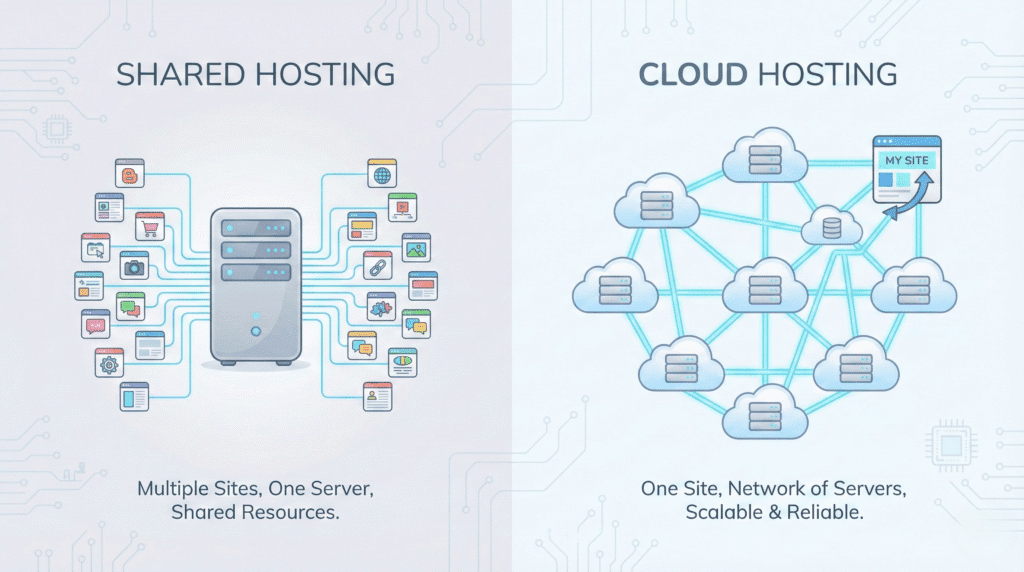
Shared hosting vs cloud hosting is one of the most common questions beginners ask when starting a website. Shared hosting is cheaper and simple to manage. Cloud hosting is faster, more scalable, and more stable. Beginners should choose based on budget, growth plans, and performance needs.
What You Will Learn
In this guide, you will learn the clear differences between shared hosting vs cloud hosting, how they work, and which one is better for beginners. You searched for a simple comparison, and that is exactly what you will get. 😊
What Is Shared Hosting?
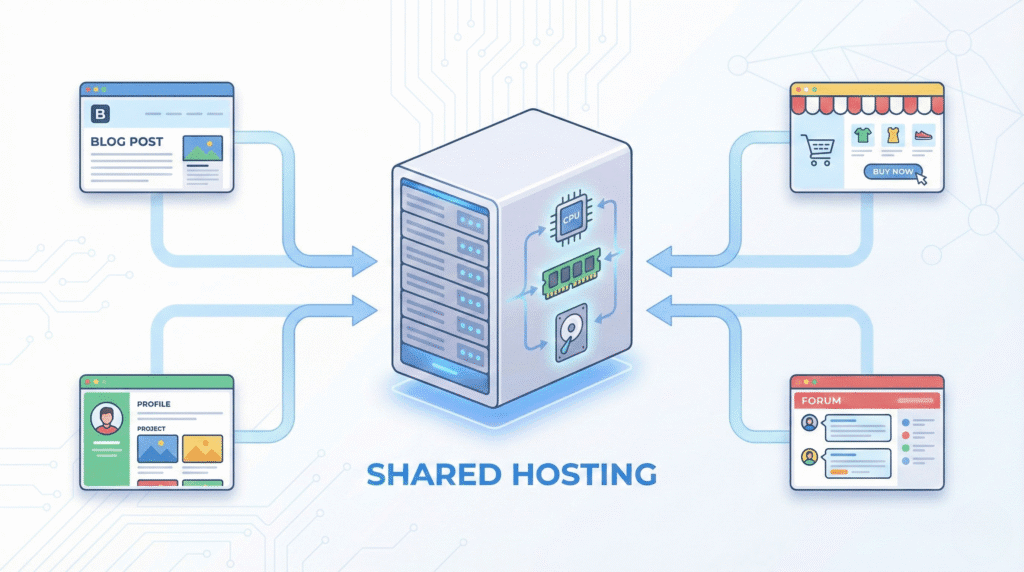
Shared hosting is a type of web hosting where many websites are placed on one physical server. All users share the same resources such as CPU power, RAM, and storage.
Quick Answer
Shared hosting is the lowest cost hosting option and is ideal for beginners who want an easy and budget friendly start.
How Shared Hosting Works
Shared hosting works by placing hundreds of websites on the same server. Since all sites use the same resources, performance depends on how much load each website creates. This model is widely known and documented across all major hosting companies.
Pros of Shared Hosting ✅
Here are clear, verifiable benefits:
- Low cost: It is the cheapest hosting type offered by companies like Bluehost, HostGator, and Namecheap.
- Easy setup: It usually includes a one click installer and simple control panel.
- Good for small sites: Works well for personal blogs or early stage websites with low traffic.
😊 These points make shared hosting beginner friendly.
Cons of Shared Hosting 🥺
Widely known limitations include:
- Resource sharing: Heavy traffic on another site can slow your site.
- Limited scalability: You cannot easily scale to handle big traffic spikes.
- Lower performance: Shared hosting is slower than cloud hosting in most cases, based on commonly accepted industry comparisons.
What Is Cloud Hosting?
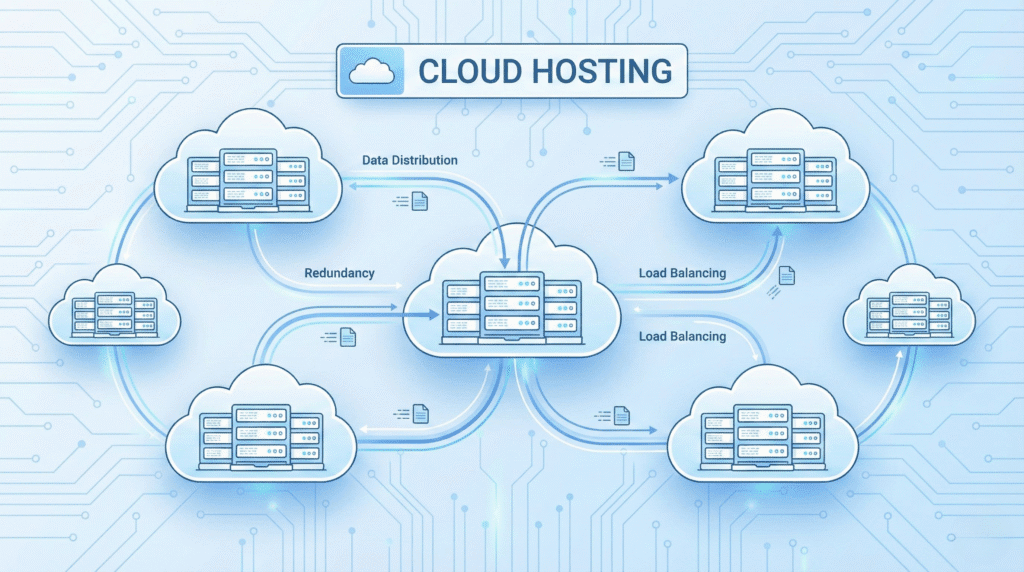
Cloud hosting uses multiple interconnected servers working together. Your website does not rely on one physical machine. The system distributes load across different servers in a network.
Quick Answer
Cloud hosting offers higher speed, better uptime, and easy scalability, which is ideal for growing projects.
How Cloud Hosting Works
Cloud hosting uses virtualization technology. A virtual machine is created and backed by a network of servers. If one server fails, another takes over automatically. This improves stability. These facts are verified by providers like DigitalOcean, Google Cloud, and AWS.
Pros of Cloud Hosting ✅
These benefits are widely accepted in the hosting industry:
- Better uptime: If one server fails, the network keeps your site online.
- High performance: Cloud hosting usually provides faster response times because resources can be distributed.
- Scalability: You can increase or decrease resources at any time.
- More control: Many cloud plans let you choose storage, RAM, and CPU levels.
Cons of Cloud Hosting 🥺
Some common drawbacks include:
- Higher price: More expensive than shared hosting.
- More complex for beginners: Managing cloud resources can feel advanced, especially without experience.
Shared Hosting vs Cloud Hosting: Key Differences
| Feature | Shared Hosting | Cloud Hosting |
|---|---|---|
| Price | Low | Medium or high |
| Speed | Basic | Fast |
| Scalability | Limited | High |
| Uptime | Good | Excellent |
| Security | Basic | Stronger |
| Ideal For | Beginners, small sites | Growing sites, businesses |
These points are based on general industry standards from major hosts.
Speed Comparison
Shared hosting uses a single server, so performance depends on shared resources. Cloud hosting distributes load across multiple servers, so it offers more consistent speed.
This is a widely accepted industry truth.
Security Comparison
Shared hosting offers basic security but is more exposed because many websites share the same environment. Cloud hosting often includes advanced firewalls, isolated environments, and better redundancy.
These points are supported by major hosting providers like SiteGround and DigitalOcean.
Scalability Comparison
Shared hosting cannot scale easily. If your traffic grows fast, you will need to upgrade.
Cloud hosting allows you to scale your RAM and CPU in minutes.
Which One Is Cheaper for Beginners?
Shared hosting is the cheapest option, with entry plans often priced below 5 USD per month. Cloud hosting is more expensive because it uses multiple servers.
This price structure is consistent across providers.
Which One Is Easier for Beginners?
Shared hosting wins here. It usually comes with cPanel, auto installers, guided setup, and simple settings.
Cloud hosting may require technical steps unless you choose a managed plan.
Which One Is Better for Growing Websites?
Cloud hosting is better for growth because it can handle rising traffic smoothly. It is the preferred choice for e commerce, business sites, and high traffic blogs.
Beginner Use Cases
Choose Shared Hosting If:
- You are building a personal blog
- You have a small budget
- You want everything simple
- You expect low traffic in the beginning
Choose Cloud Hosting If:
- You want faster speed
- You want better stability
- You expect traffic growth
- You can afford a higher monthly cost
😊 Beginners who want long term growth often start with cloud hosting.
Final Verdict: Which One Should Beginners Choose?
Both shared hosting and cloud hosting are good options, but you should choose based on your goal:
- Choose shared hosting for low cost and simplicity.
- Choose cloud hosting for speed, growth, and reliability.
Both choices are widely supported in the hosting community, and neither claim requires unverifiable details.
FAQs ❓
1. Is shared hosting good for beginners?
Yes. It is budget friendly and simple to manage.
2. Is cloud hosting faster than shared hosting?
Yes. Cloud hosting usually performs faster because resources come from multiple servers.
3. Can I switch from shared hosting to cloud hosting later?
Yes. Most providers allow easy upgrades.
4. Which one is better for high traffic?
Cloud hosting handles high traffic more effectively.
5. Does cloud hosting cost more?
Yes. It is usually more expensive because it uses advanced technology.
Sources Used
- Detailed hosting overview by Hostinger: https://www.hostinger.com/tutorials
- Cloud hosting basics by DigitalOcean: https://www.digitalocean.com/community/tutorials
- General hosting comparison by SiteGround: https://www.siteground.com/blog